ClaudePulse for Windows
Track Claude Code sessions and return to the terminal that needs you
ClaudePulse for Windows is Stan Shih’s Windows adaptation of a session-monitoring concept inspired by tzangms’s original macOS ClaudePulse. It uses Claude Code hooks to show local session state and notifications.
閱讀繁體中文指南 →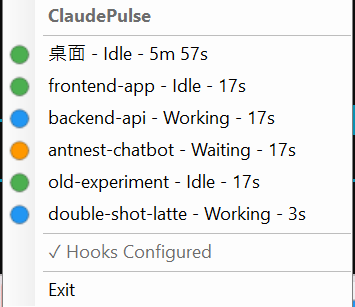
Windows adaptation and original project
I maintain ClaudePulse for Windows. Its inspiration is the macOS ClaudePulse project by tzangms, whose current README calls it Pulse for Claude Code. The Windows implementation and the original macOS application have separate repositories and setup instructions.
The Windows tool focuses on Claude Code sessions: a system-tray indicator summarizes activity, while notifications help you return to a session that needs input or permission.
Start with one session
Open the Windows repository and choose the setup instructions for the version you intend to run. Its source README documents Windows 10/11 and a .NET-based build. Requirements in older release notes can differ from the current source, so check the chosen release rather than assuming every download has the same runtime requirements.
Launch ClaudePulse, then open a Claude Code session. On first launch, the hook configurator adds its HTTP hooks to the existing Claude Code settings. It is designed to merge its entries without replacing other hooks. Verify that the session appears and changes state while you work before relying on alerts across several terminals.
Read the tray and notifications
The README describes blue as Working, orange as Waiting for permission, green as Idle, and gray as Stale after more than ten minutes without activity. The shared icon gives working sessions priority, so a blue icon does not describe every session individually.
A three-second debounce reduces notifications from intermediate stops; permission requests receive a separate immediate alert. Clicking a notification can bring the corresponding terminal window forward. Check the terminal’s prompt or result when you return.
What the status can tell you
A local HTTP listener receives Claude Code hook events and updates the session state. If a session is absent or stops updating, first check that ClaudePulse is running and that the Claude Code hooks are configured as described in the repository.
Idle and Stale are observations of session activity. They do not establish that code is correct, tests passed, or the task achieved its intended result. This tool also does not measure the public Claude service’s uptime or your account quota.
Related work by the same developer
Notify+ applies a different notification workflow on Android, organizing incoming LINE messages by conversation. The links below lead to that case study and my broader software directory.